
Forja: code mode
Forja is how Alisio runs code on the model's behalf. Instead of calling ten tools one at a time and carrying every answer through the conversation, the model writes a short script that composes the calls, filters the data and returns only what matters. Two tools make up code mode:
js_runcomposes tools: a JavaScript script in an isolated VM that calls other tools (read_file,search_text, your MCP tools…), runs them in parallel and returns a small result.python_runhandles data, machine learning and dashboards: a Python script that reads files, analyses them and publishes the files it produces (Python analysis).
Both run on the same execution core: every run is journaled, reports progress, has limits and can be cancelled, and the result says which engine ran and why.
Know what each level of isolation means
js_run is isolated by construction. python_run is only as isolated as the backend Alisio picks, and one of them is not a sandbox at all. Isolation and its limits lists exactly what is and is not guaranteed.
Choosing the language
The model chooses; you do not configure it. The routing rule in the system prompt tells it to use:
| Task | Tool |
|---|---|
| Combine several tool calls, filter or aggregate their results, paginate, fan out in parallel | js_run |
| Read a spreadsheet or CSV, statistics, charts, a report, a dashboard, scikit-learn or statsmodels | python_run |
| A designed PDF from Markdown or structured content (reports, memos, printable documents) | document_create (see Designed PDFs); python_run keeps programmatic PDFs: forms, merging, reportlab |
| One call to one tool | The tool itself, no script needed |
Before writing non-trivial code the model can call forge_guide for the current limits, tools and packages. js_run scripts have no files, network or system access of their own: everything goes through nested tool calls, and each nested call passes the same permission gate as a call from the model (a call that would need an approval is refused with APPROVAL_REQUIRED instead of asking, so the script cannot ask on its own). Stored grants do not apply to nested calls: a direct call with a grant may run while the same call nested in a script receives APPROVAL_REQUIRED. This is deliberate.
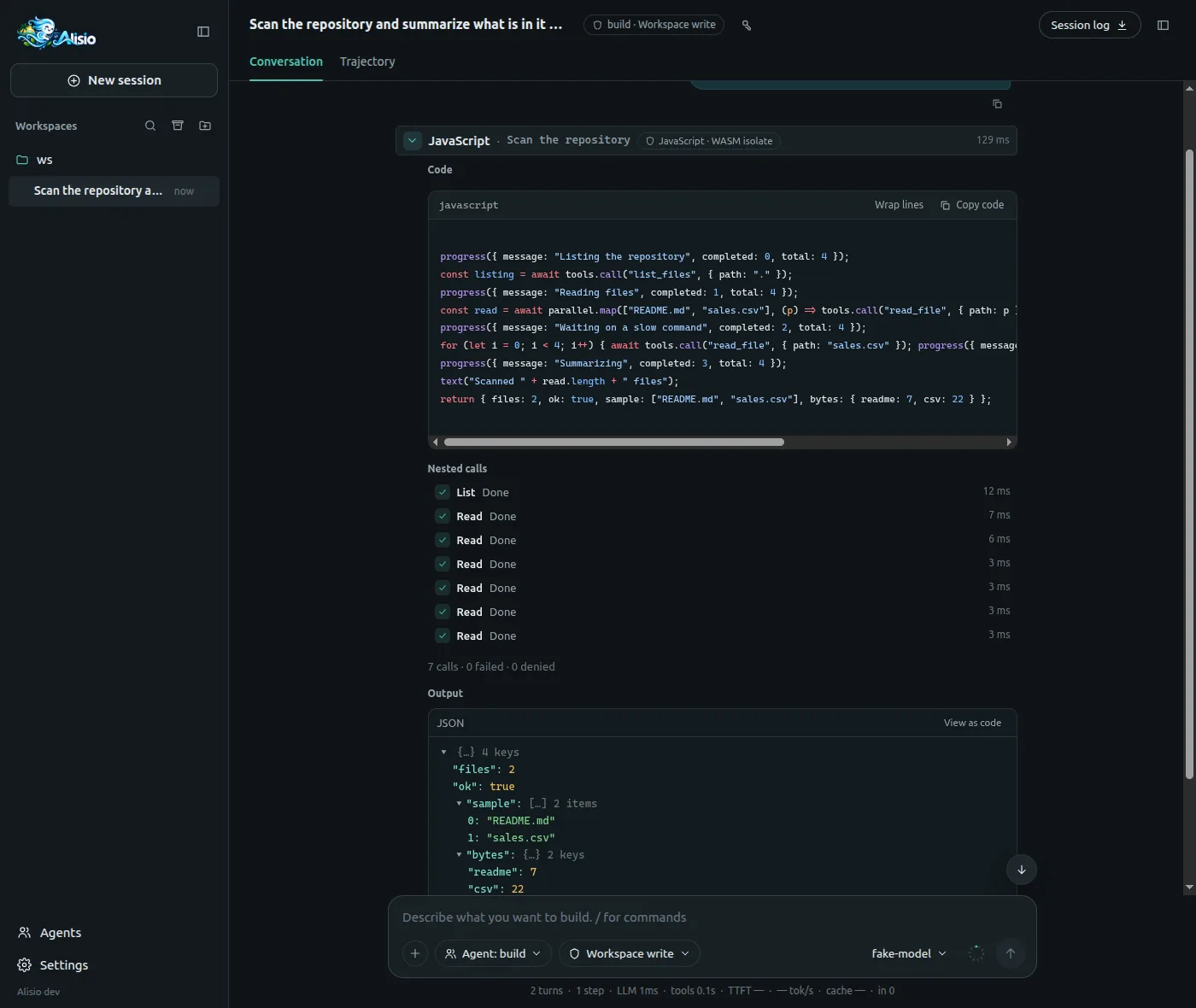
js_run card: the code, the nested calls with their status and duration, and what the script returned.When forge.javascript.enabled is on (the default), js_run replaces the older execute tool, which is no longer registered; sessions saved with execute calls still open and render as before. Set it to false to get execute and the previous prompt back.
Isolation and its limits
| Engine | Where it runs | What it guarantees |
|---|---|---|
js_run | QuickJS compiled to WebAssembly, in a worker thread (Node) or a child process (Bun, the standalone binary) | No files, network, timers or process: the VM only sees what the host hands it. Time, heap, stack, call and output limits are enforced; a stop is confirmed. |
python_run on oci | A Docker or Podman container | No network, a read-only root, only the job folders mounted. |
python_run on wasm | Pyodide in a restricted Node process (Node Permission Model) | Files limited to the job (and a link-free copy of the scratchpad), no child processes. See the limits below. |
python_run on managed | Your own Python | None. It runs with your user permissions. |
Alisio picks the Python backend (see Where a script runs); the model never does. The honest limits:
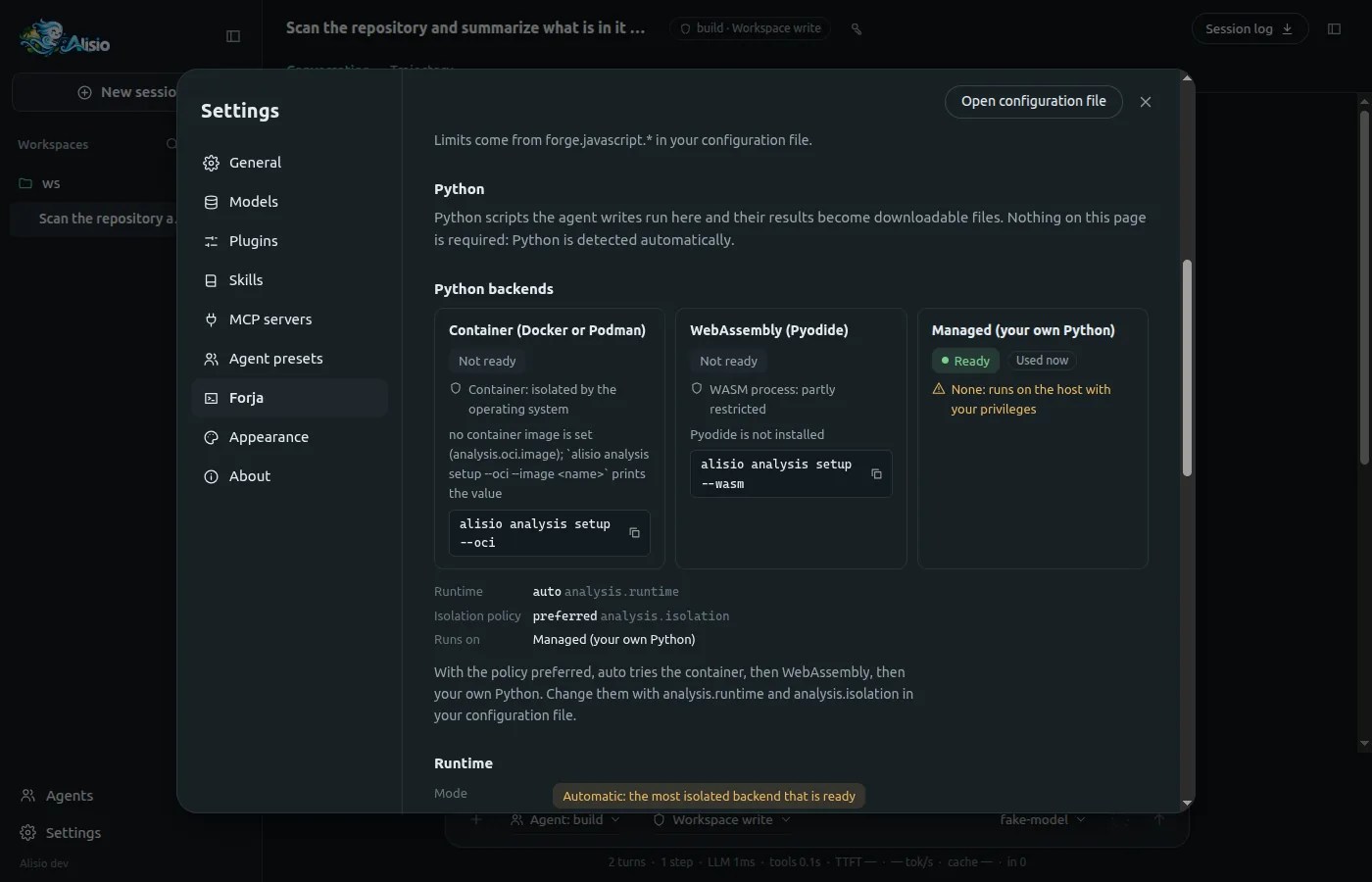
wasm, network: it is not blocked on Node 22 and 24: Python can reachnode:httpthrough the bridge. Alisio probes the real process and reports what it saw;analysis.isolation: strictexcludeswasmunless the probe saw the network refused.wasm, memory: a soft limit. The parent samples the process every 250 ms and kills it aboveanalysis.wasm.memoryMb, so it can overshoot briefly.wasm, escaping: the Permission Model is not a boundary against hostile code. A script can reach the runner's JavaScript (FFI reaches the process); the runner holds no secrets and the host validates everything it produces.wasm, what a script can still see: it is a mitigation, not a sealed box. Through the bridge a script can reados.homedir(),os.hostname()andos.userInfo()(user name and home path), and the absolute host paths of the distribution and of the job folders appear in the child'sprocess.argv. File contents outside the job stay out of reach. What the runner prints when it fails has host paths replaced by placeholders (<dist>,<job>/...) before it reaches the model.wasm, scratchpad: the child never gets the real scratchpad. The parent copies it into the job folder without following links (symbolic links and special files are left out, 64 MB at most) and grants read access to that copy only, so a link planted in the scratchpad cannot lead anywhere. Onocithe scratchpad is mounted read-only, and a link inside it resolves inside the container.wasm, Node version: the Node Permission Model had a symlink bypass (CVE-2025-55130, fixed in Node 22.22, 24.13 and 25.3). Thewasmbackend refuses any older Node and says why; Node 23 never got the fix.managed: not sandboxed. Read the script in the approval before allowing it.js_runworker host: the VM is isolated, but the worker is a thread of the Alisio process. A flaw that escaped the WebAssembly engine would compromise the host process, which is why Bun and the binary use a child process, and whyforge.javascript.hostexists for diagnosis.
Configuration
Forja lives under forge in config.json; Python backends live under analysis (see Configuration). A project may only lower the limits and switch features off.
| Key | Default | Meaning |
|---|---|---|
forge.javascript.enabled | true | js_run on (and execute off) or off. Editable from the web UI |
forge.javascript.host | "auto" | auto (worker on Node, process on Bun), worker or process. Global only |
forge.javascript.timeoutMs | 30000 | Time limit per script (up to 300 000). A project may lower it |
forge.javascript.memoryBytes | 33554432 | VM heap (up to 128 MiB). Global only |
forge.javascript.stackBytes | 262144 | VM stack (up to 512 KiB). Global only |
forge.javascript.maxToolCalls | 50 | Nested calls per script (up to 500). A project may lower it |
forge.javascript.maxConcurrency | 4 | Nested calls at once (up to 16). A project may lower it |
forge.javascript.maxOutputChars | 16000 | Characters returned to the model (up to 48 000). A project may lower it |
forge.state.enabled | true | The state object scripts share across runs of the session |
forge.state.maxTotalBytes | 524288 | Size of that state (up to 8 MiB). Global only |
forge.scratch.enabled | true | The scratchpad. Global only |
forge.scratch.root | unset | Base folder of the scratchpads; ALISIO_TMPDIR wins. Global only |
forge.scratch.retentionDays | 7 | Days without activity before a scratchpad is removed; 0 never |
forge.scratch.maxBytes | 268435456 | Quota per session |
forge.guides.enabled | true | The forge_guide tool. Editable from the web UI |
analysis.runtime | "auto" | auto, managed, oci or wasm. Global only |
analysis.isolation | "preferred" | preferred, required or strict: what auto may fall back to. Global only |
analysis.wasm.* | Memory, startup margin, input size and node path of the WebAssembly backend |
{
  "forge": { "javascript": { "timeoutMs": 60000, "maxToolCalls": 100 } },
  "analysis": { "runtime": "auto", "isolation": "required" }
}
Checking and preparing the engines
alisio forge status           # JavaScript and every Python backend: state, isolation, limits, why not ready
alisio forge status --probe   # also runs a real script through the isolate
alisio forge status --json
alisio analysis setup --wasm  # download the pinned Pyodide runtime (about 44 MB; --profile science adds scipy and scikit-learn)
alisio forge status verifies the WebAssembly module against its pinned SHA-256, shows the host that will run it and, for each Python backend, whether it is ready, its isolation and whether the operating system denies its network. The web UI shows the same on the Forja page.
The scratchpad
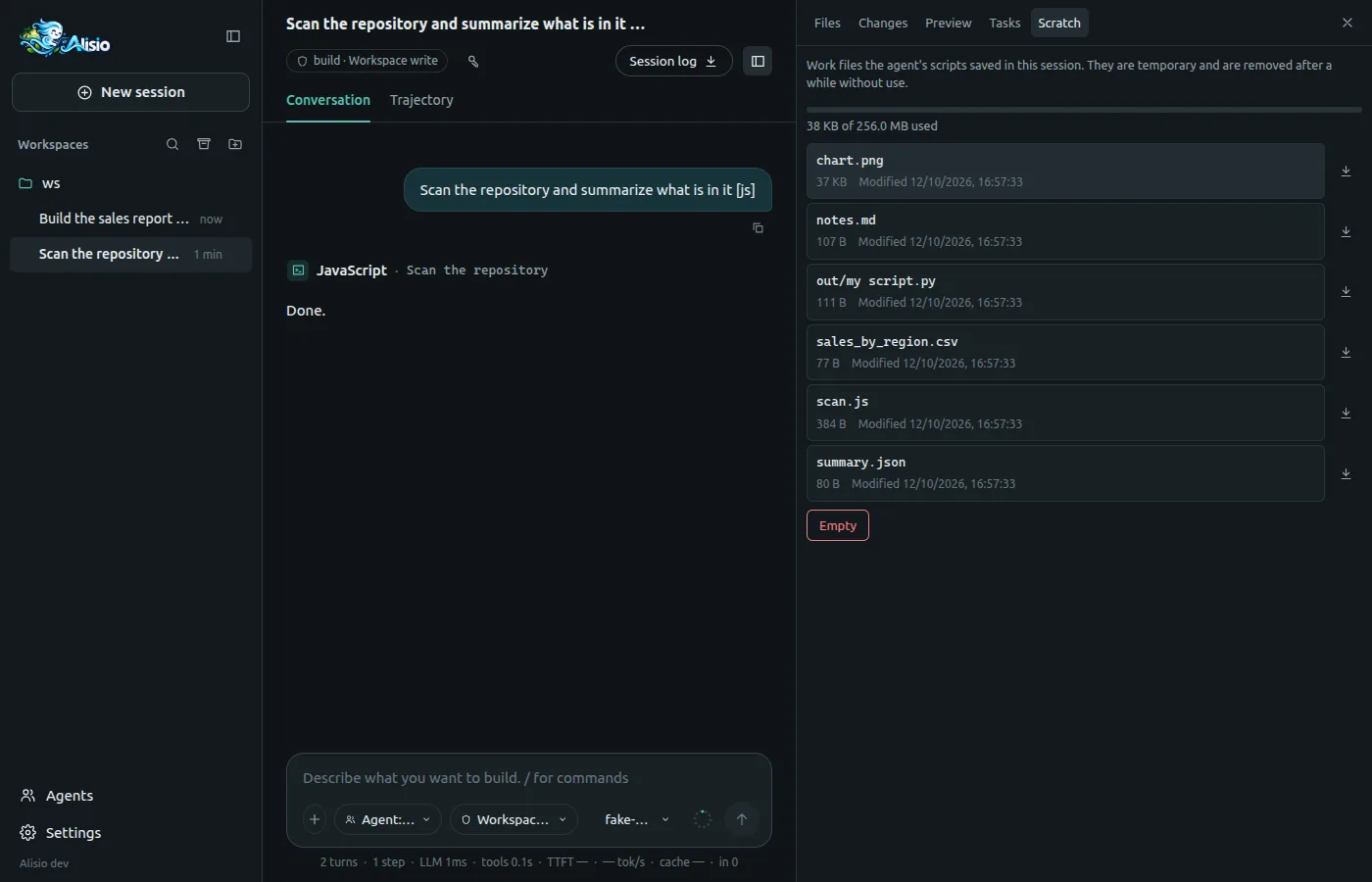
A scratchpad is a private folder per session where the model keeps long scripts and intermediate files, so it can edit plan.js between runs instead of resending the whole code, and run it with codePath:
js_run     { "codePath": "scan.js" }
python_run { "codePath": "out/report.py" }| Property | Behavior |
|---|---|
| Location | <tmp>/alisio-<uid>/<workspace>/<root session>/scratchpad/, under ALISIO_TMPDIR or forge.scratch.root when set; a child session shares its root's scratchpad. If the shared folder is not private to you, Alisio falls back to <state>/scratch/ and says so |
| Permissions | Created 0700 and checked (a directory, not a symbolic link, yours). Writes with the file tools need no approval inside it; --read-only still denies them |
| Retention | Removed after forge.scratch.retentionDays (7) without activity, or when the session is deleted; swept at most once a day, never outside the verified root |
| Quota | forge.scratch.maxBytes (256 MiB). A write that would exceed it is denied with a clear error; nothing is deleted |
codePath | A relative path inside the scratchpad; ../ and symbolic links that escape fail with INVALID_INPUT |
ALISIO_SCRATCH_DIR | Where python_run sees the scratchpad: read-only. On managed Python it cannot be enforced, because that backend is not a sandbox |
The web UI lists it in the Scratch tab of the side panel: name, size and date, a quota bar, a preview of text and code files (.js, .py, .csv, .json, .md), download and Empty with a confirmation. It does not edit anything. Emptying is refused while a Forja script of the session is running.
On-demand guidance: forge_guide
forge_guide(topic) returns a short guide generated from the live state of the engines (limits, callable tools, the Python backend that would run now and its packages). It exists while Forja is on and forge.guides.enabled is not false; a script cannot call it. The topics, the etag mechanism and the error hints are in Tools and permissions.
In the web UI
Forja settings page. Settings → Forja shows the JavaScript engine (state, version, WASM hash, host, limits, scratchpad) with the
forge.javascript.enabledswitch, the Python section, and the guides switch. Values without a switch are read-only and show the key to change in the file.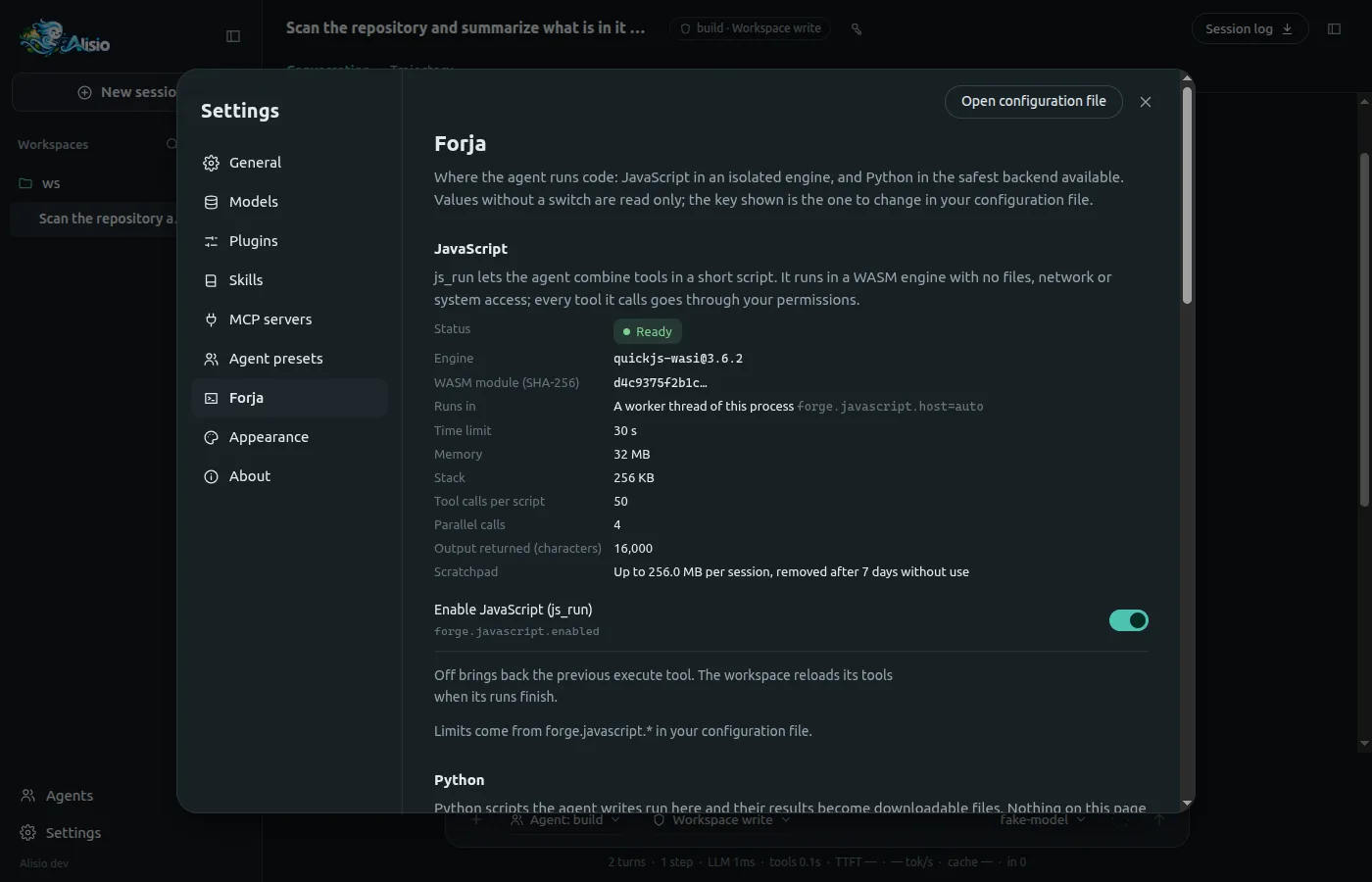
Settings → Forja: the JavaScript engine, its effective limits and the switch for js_run.js_runcard. Title, status, duration and a badge with the engine and its isolation; the body shows the highlighted code (with a copy button), the nested calls live with their status and duration, a progress bar when the script reportscompletedandtotal, the value, the text output and any error with its hint. There is no automatic re-run.python_runbadge. A badge with the backend and its isolation, written out and never only a colour (the host backend is marked as not sandboxed), and one line with the reason it was chosen. Published artifacts also show their provenance (engine, isolation and reason).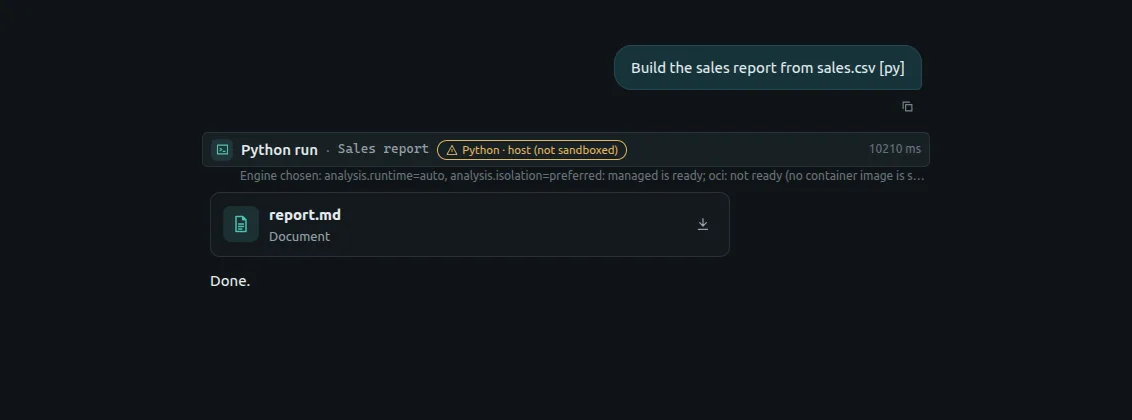
A python_runcard: the backend badge, the reason it was chosen and the artifact it published.Scratch tab. See The scratchpad.
In the terminal
The row of a js_run shows the script's own note and fraction when it reports one, then 2/3 calls (nested calls finished out of started); the row of a python_run adds oci, wasm or host! for the backend. The final duration goes on the right as with any tool, and cancelling works the same. Headless runs (alisio run) stream the same progress in the JSONL output.