AlisioYour work. With more possibilities.
AI that works with you.

Work with documents and data, find apps for your tasks and build your own plugins by describing what you need. Alisio brings artificial intelligence to your daily work, from a desktop app.
Alisio is a desktop app with artificial intelligence that helps you with tasks from your work, your studies and your daily life. Describe what you need: Alisio organizes the steps, uses the tools available and helps you reach a result you can review and use. It works with the files in the folder you choose, asks before it changes anything and lets you add apps for your work, from the catalog or built by you. Teachers, students, office staff, accountants and anyone at home can start without learning new technical terms; programming is still possible, as an advanced use.
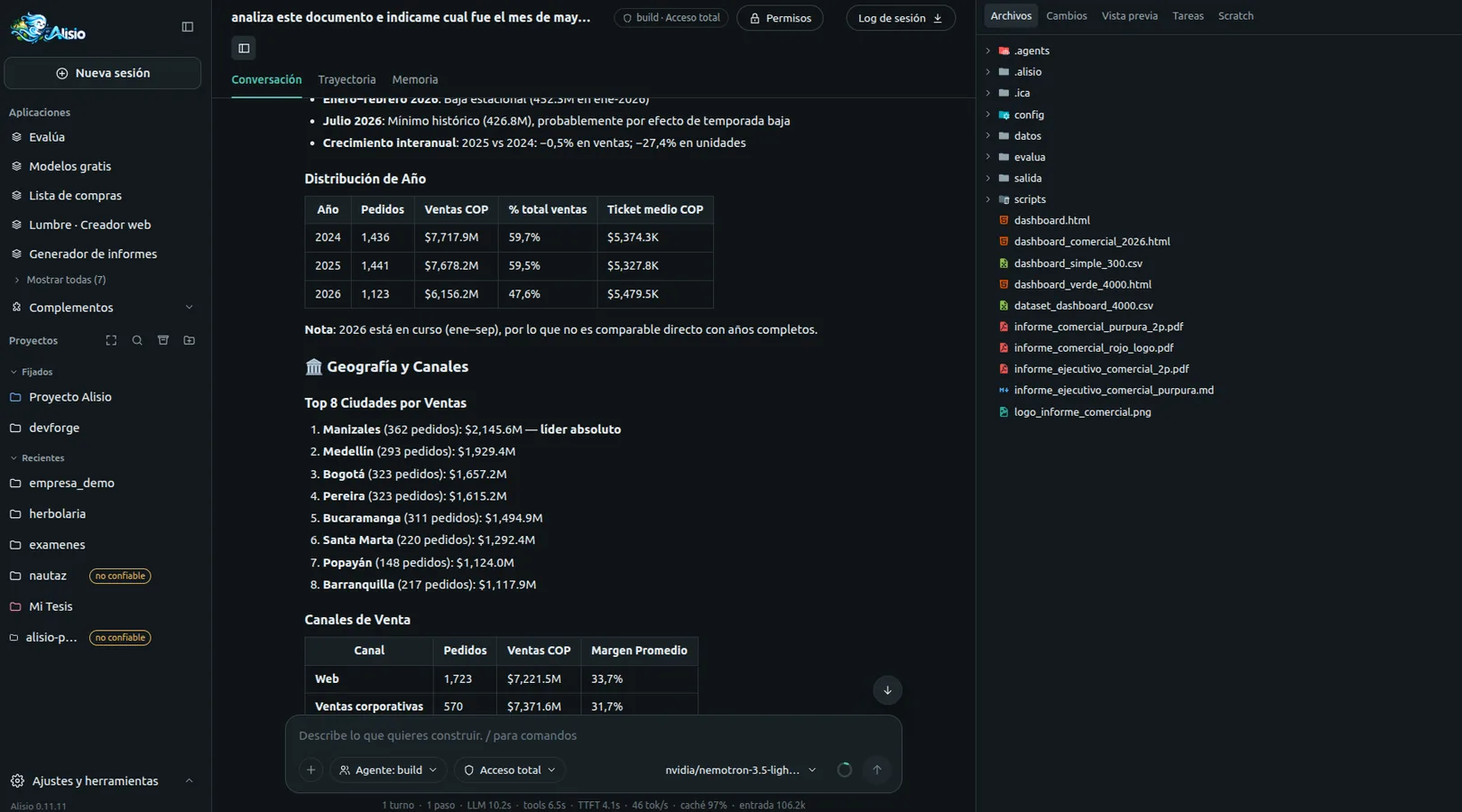
Ask in your own words, see what Alisio is doing and approve each change. The desktop app shows this interface in its own window; it also opens in your browser.
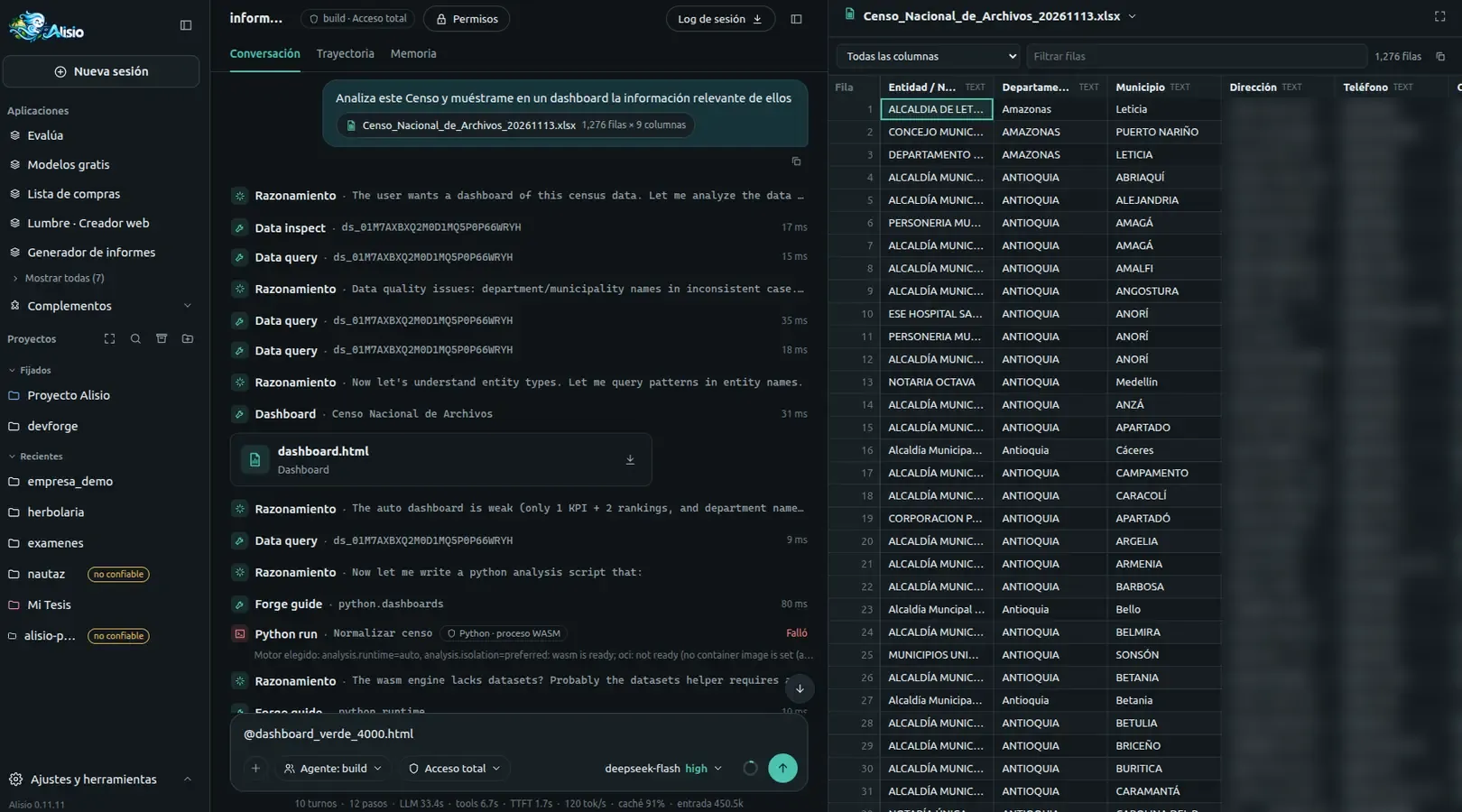
Bring your spreadsheet. Attach an Excel file and ask for what you need; the table opens beside the chat so you can filter it while Alisio works through the steps.
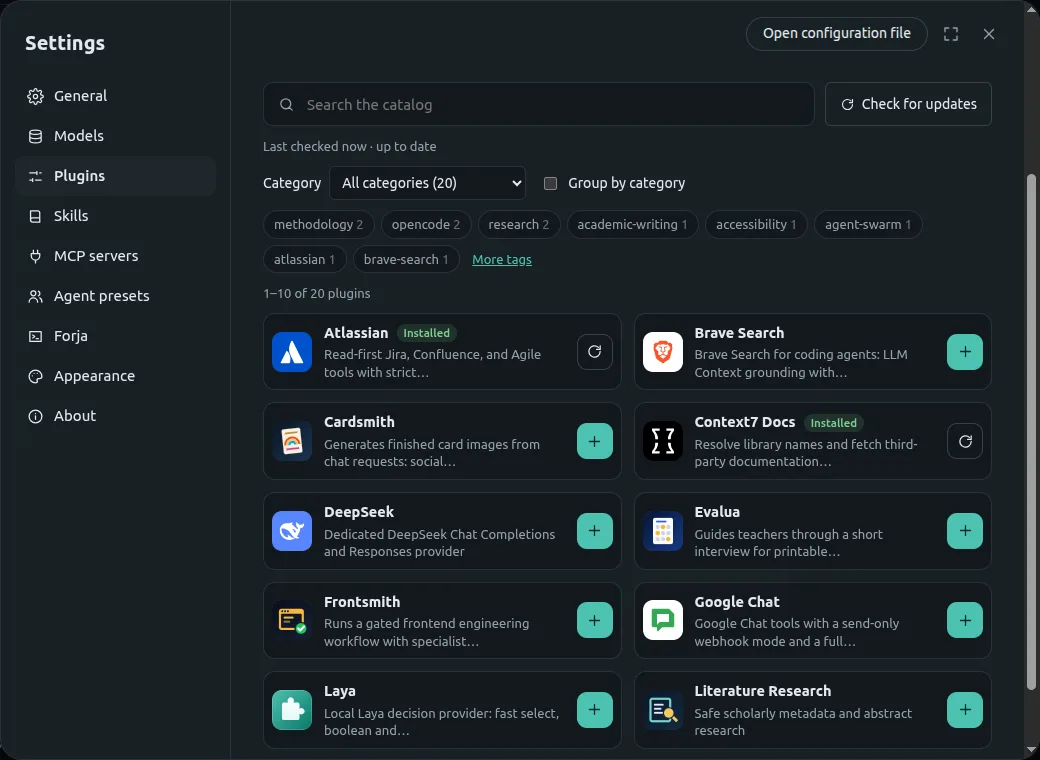
Explore the plugin catalog and install what you need in one click: thesis writing, literature research, printable math exams, certificates and cards. Installed plugins can be updated or removed from the same screen.
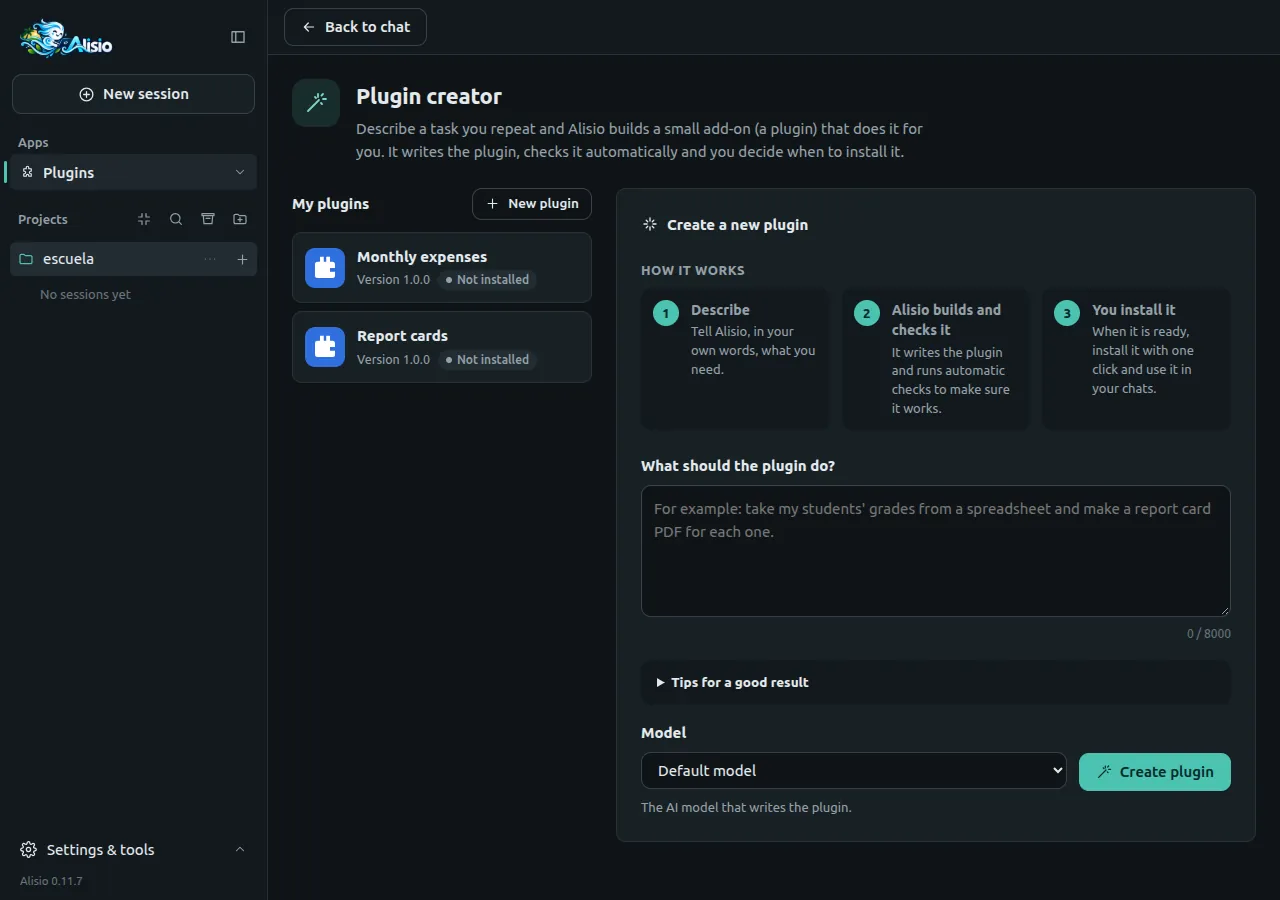
Describe a task you repeat, in your own words. The plugin creator builds the plugin, checks it and lets you decide when to install it, even with its own screen in the Apps menu.
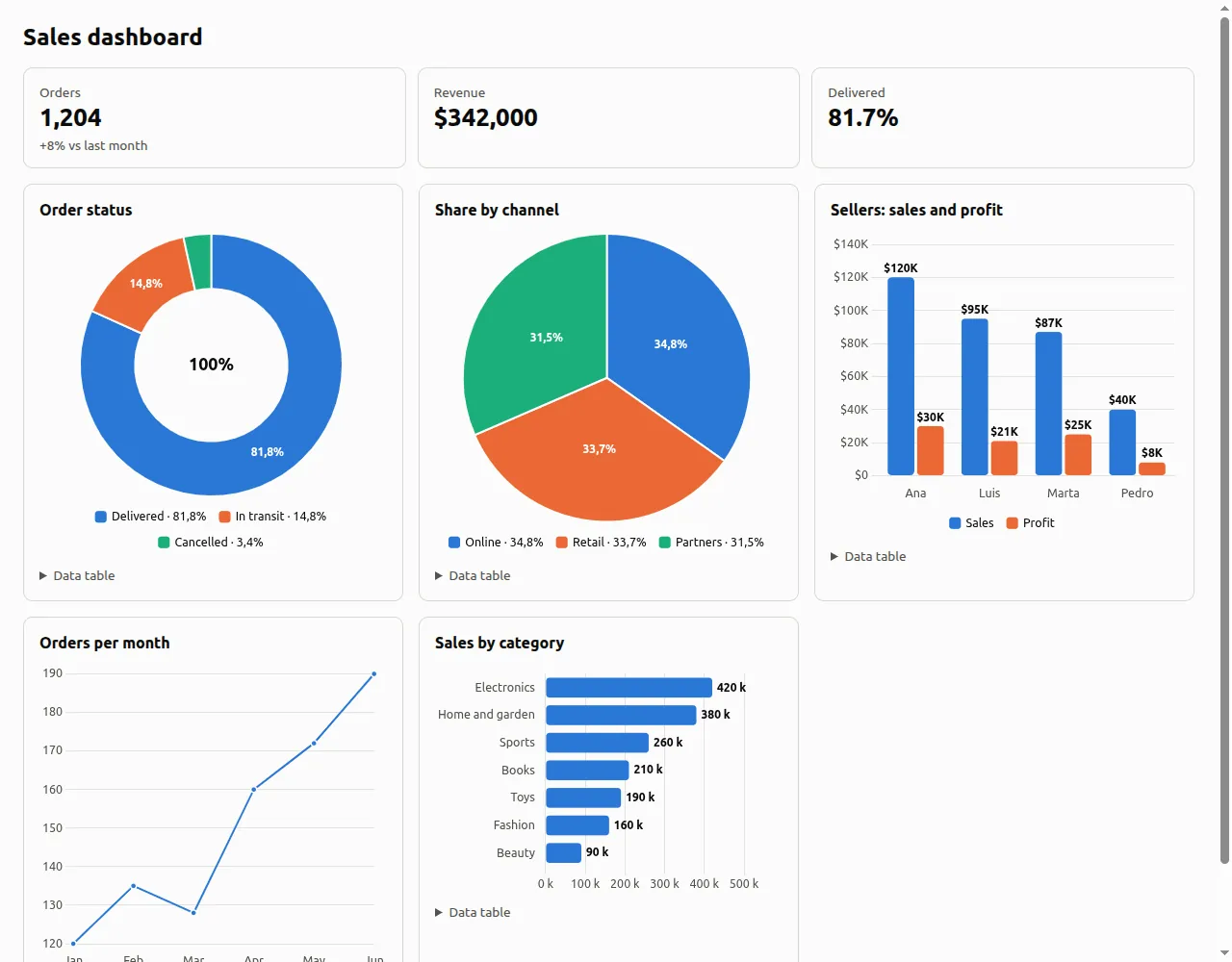
Work with your documents and data and get PDFs, spreadsheets, charts, reports and dashboards you can review, adjust, open, print or share.
Plugins add tools and apps for a profession. You find them in Settings → Plugins → Plugin catalog, install a private one from a file, or create your own with the plugin creator. Connections to other tools and services come from the MCP catalog, with guided sign-in, a connection check and one-click removal.
| What you want to do | What it uses | Status |
|---|---|---|
| Analyze CSV and Excel tables, charts, reports and dashboards | Built in (Smart Dashboard, Forja) | Included |
| Designed PDF documents | Built in (Designed PDFs) | Included |
| Printable exams | @alisio/plugin-evalua | Plugin to install; school math only |
| Thesis writing and literature research | @alisio/plugin-thesis, @alisio/plugin-literature-research | Plugins to install |
| Certificates, cards and charts | @alisio/plugin-cardsmith | Plugin to install |
| A helper for your own task | Plugin creator | Included |
| Connect a tool or service | MCP catalog | Included |
The quality of a result depends on the plugin, the model and the services you use. In health, accounting, education or any sensitive decision, Alisio supports your work; it does not replace your professional judgment.
No. You install the app, connect a model in Settings → Models, open a folder and describe the task. Plugins install from the catalog and the plugin creator builds new ones from a description. Current limits: some services in the MCP catalog still need manual setup.
Alisio is free and open source, under the MIT license. The model you connect may have its own cost: online model services charge according to their own prices, and some connected services require an account. A model running on your own computer has no service fee.
It depends on what you connect. Alisio and your sessions live on your computer, but the content it reads to help you is sent to the model you configured and, when you use them, to the connected tools and services. With a model on your own computer, that content stays on it, except for tools that use the internet.
It depends on the model and the tool. With an online model you need internet. With a model running on your own computer, Alisio can work offline, but installing plugins, refreshing the catalogs, web search and online services need a connection.
Yes, for the tasks in Apps for your work: data analysis and reports, designed PDFs, school math exams, thesis writing, certificates and cards. For other tasks, check whether a plugin exists or build one with the plugin creator. Review every result before you use it.
Programming is an advanced, optional use. This short clip shows Alisio in the terminal, the path for developers and scripts.
Requires Node.js 22.16 or later
npm i -g @alisio/alisio-codeAfter installing
alisioTerminal UIalisio serveWeb UIalisio run "Explain this repository"Headless, for scripts and CIalisio run with JSONL events and session resume, for scripts and CI.AGENTS.md instructions and Agent Skills.js_run combines several tool calls, filters and paginates results, and transforms JSON and text. It runs in a fresh QuickJS WebAssembly VM with no file, network or process access: it can only call Alisio tools, under the same permissions as the agent.python_run covers pandas and NumPy, statistics, scikit-learn, charts and custom dashboards. It runs in a container (oci) or in a restricted Pyodide WebAssembly process (wasm) when available; with analysis.isolation: required it never runs unsandboxed.forge_guide, the guide for each language loads only when the task needs it, adapted to the engines and packages actually installed, so the prompt stays small.Alisio 0.11.12 is a stable release, still pre-1.0: minor versions may include breaking changes (see Stability and versioning). Read Known limitations before relying on it. Alisio as a whole is not a sandbox: the shell, local tools and plugins run with your user privileges. Only Forja isolates code (js_run, and Python on the oci or wasm backends), with the limits documented in Forja.